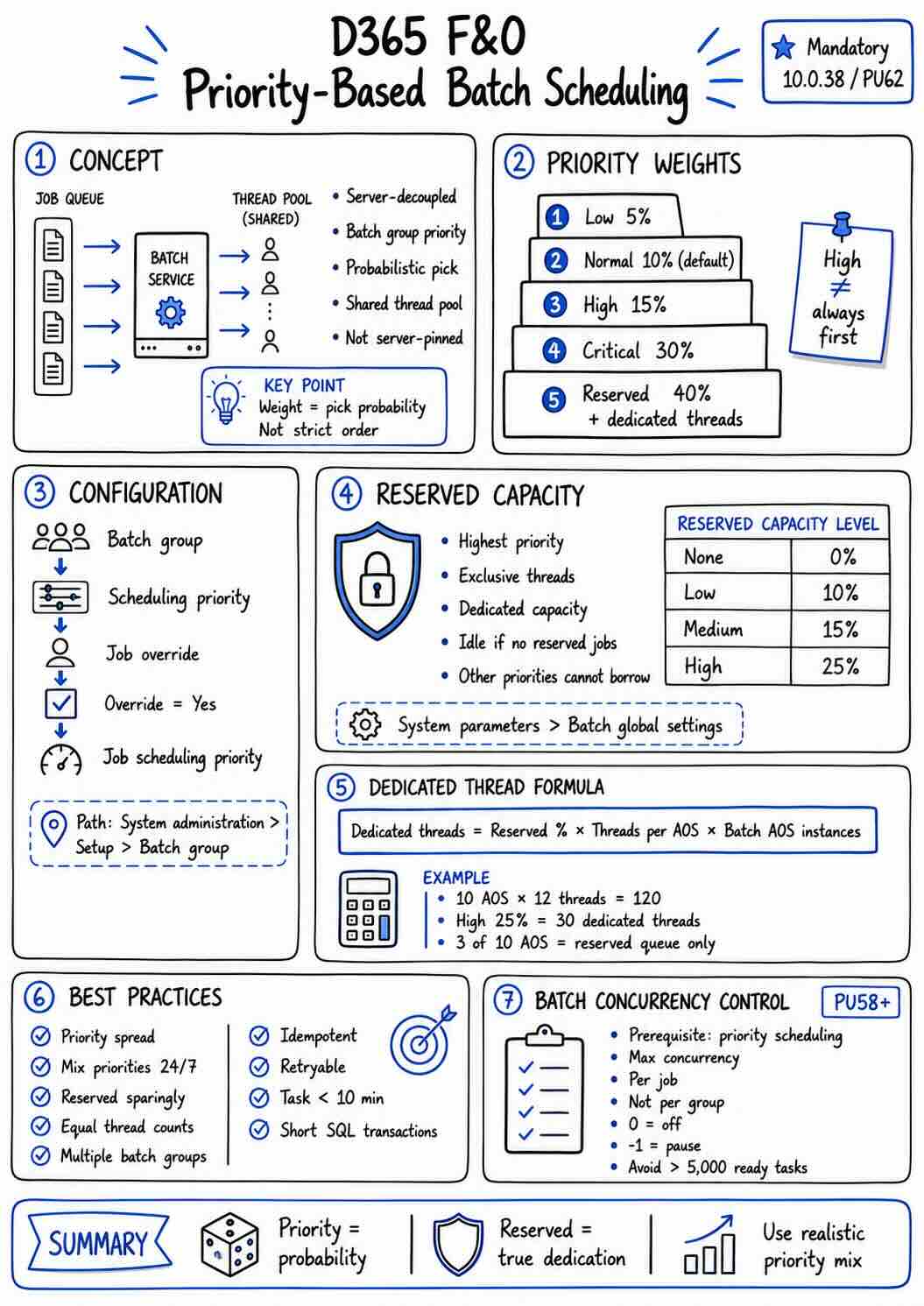
In Dynamics 365 Finance & Operations, priority-based batch scheduling decouples batch jobs from specific batch servers. Instead of pinning a job to a server, you assign a relative priority to each batch group, and the system uses that priority to decide how likely a task is to be picked from the queue across all available servers.
- Priority is probabilistic weighting, not a strict ranking. A High job does not always beat a Normal job — it just has a higher chance of being picked.
- Reserved capacity is the only priority that gives true dedicated resources. Everything else shares the same thread pool.
How scheduling priority works
Set a Scheduling priority on each batch group (and can override it per job).
| Priority | Weight |
|---|---|
| Low | 5% |
| Normal | (default value) 10% |
| High | 15% |
| Critical | 30% |
| Reserved capacity | 40% + Dedicated X threads |
Key point: priorities do not stack-rank tasks against each other. They determine the probability by which a task is picked for execution.
Configure scheduling priority
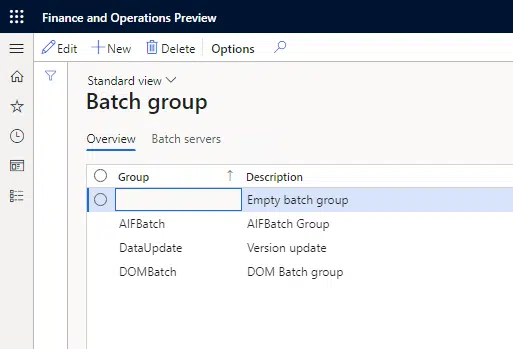
- Go to System administration > Setup > Batch group.
- Create or open a batch group.
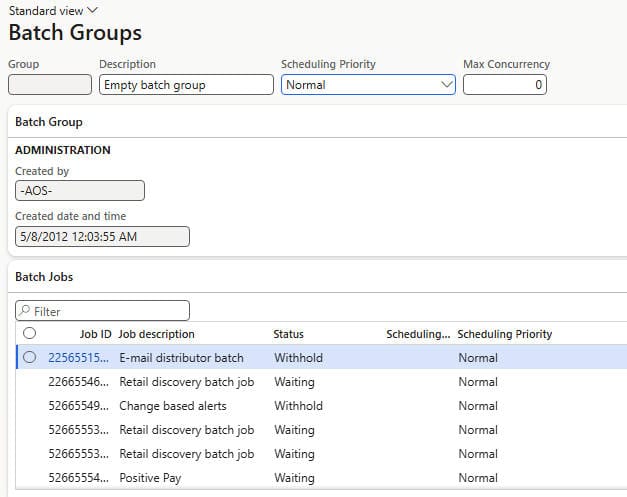
- In the Scheduling priority field, choose the default priority for jobs in that group.
- To override at the job level, open the batch job, set Scheduling priority is overridden to Yes, and choose a value in Job scheduling priority.
e.g. if 100 tasks are queued (40 reserved, 30 critical, 15 high, 10 normal, 5 low), the system does not run them in priority order. It picks tasks according to the weight of each priority tier.
Reserved capacity and dedicated threads
Reserved capacity is the highest priority. Beyond its 40% weight, it can also dedicate a fixed slice of threads exclusively to reserved-priority jobs. You control how large that slice is with the Batch reserved capacity level:
| Reserved capacity level | Share of cumulative batch threads reserved |
|---|---|
| No reserved capacity | 0% (default) |
| Low reserved capacity | 10% |
| Medium reserved capacity | 15% |
| High reserved capacity | 25% |
Configure it at System administration > Setup > System parameters > Batch global settings > Batch reserved capacity level.
How dedicated threads are calculated
The number of dedicated threads is a percentage of the cumulative batch threads across your environment. Cumulative threads = threads per AOS instance × number of batch AOS instances. So:
Dedicated threads = Reserved capacity level (%) × Maximum batch threads per AOS × Batch AOS instances- Server configuration >>> Maximum batch threads per AOS
- Server configuration >>> Batch AOS instances — the number of batch-enabled AOS nodes in the environment.
- System parameters >>> Reserved capacity level (Low/Medium/High = 10%/15%/25%).
e.g. 10 AOS instances × 12 threads = 120 cumulative threads. High reserved capacity (25%) = **30 dedicated threads**, allocated across 3 of the 10 AOS instances. Those 3 instances process only the reserved queue.
Important behaviors
- Reserved capacity is exclusive. Those threads are only available to reserved-priority jobs. If no reserved tasks exist, the dedicated AOS instances sit idle — other priorities cannot borrow them.
Best practices
Microsoft’s guidance for getting real value from priority-based scheduling:
- Don’t make everything the same priority. If every job is High or Critical, priority means nothing. Aim for a spread, for example:
| Priority | Suggested share of jobs (excluding Reserved capacity) |
|---|---|
| Low | 10% to 50% |
| Normal | 15% to 35% |
| High | 15% to 35% |
| Critical | 10% to 30% |
- Mix priorities around the clock. Don’t cluster all Normal jobs in the morning and all Critical jobs in the evening — keep a blend running at all times.
- Use reserved capacity sparingly. It behaves like dedicated hardware. If you don’t genuinely need that guarantee, leave jobs on the standard priorities.
- Keep thread counts equal across servers to avoid performance degradation.
- Use multiple batch groups with different priorities — that is the whole point of the feature.
- Make tasks idempotent and retryable. Implement the BatchRetryable interface and set a retry count greater than 0 so the system recovers from SQL Server transient errors.
- Break up large workloads so individual tasks finish in 10 minutes or less, and keep SQL transactions short to avoid blocking.
Related: batch concurrency control
From Platform update 58, the Batch concurrency control feature (which requires priority-based scheduling as a prerequisite) lets you cap how many tasks run concurrently within a single batch job, via the Max concurrency field on the batch group.
- The limit applies per job in the group, not cumulatively for the whole group.
- Set it to 0 to disable concurrency control (default), or -1 to pause all jobs in the group.
- Avoid it for jobs with more than 5,000 concurrent ready-to-run tasks, as it can degrade scheduling performance.
Summary
Scheduling priority controls the probability a task is chosen from the shared thread pool; reserved capacity is the only way to truly dedicate threads. Configure a realistic spread of priorities, reserve capacity only when you have steady reserved-tier demand, and calculate dedicated threads as reserved % × threads per AOS × AOS instances.