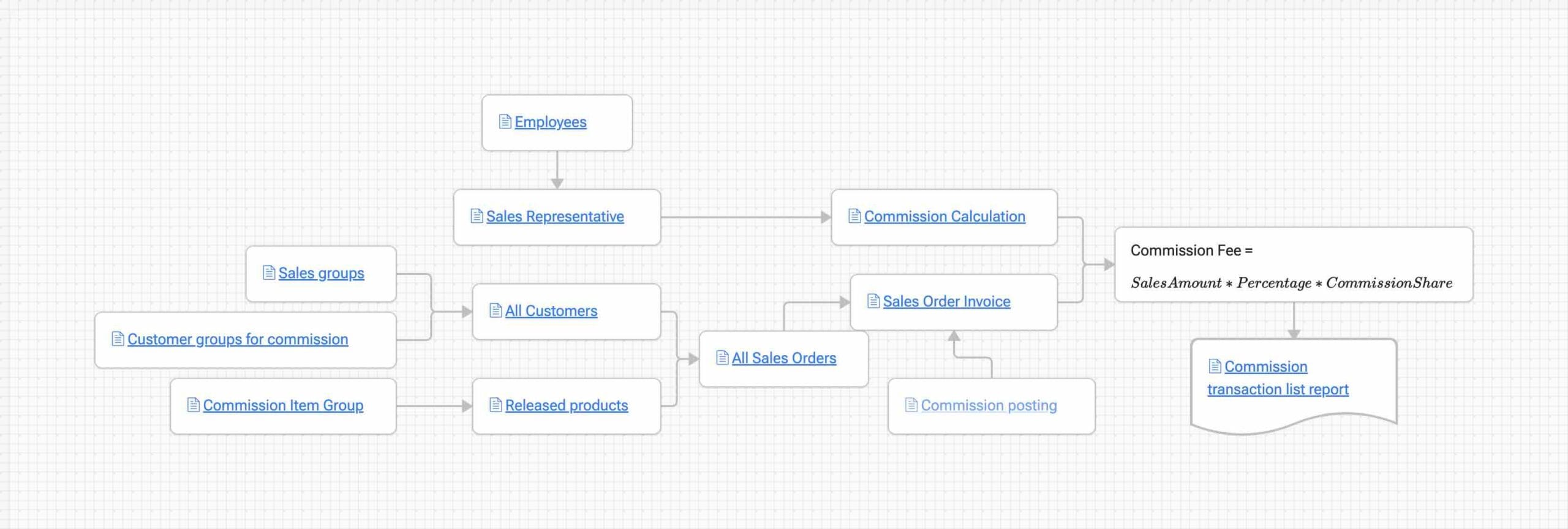
Commission is used to calculate and distribute commission from a sales order to members of a commission sales group
Set up
Customers
Customer groups for commissionSales groups
Items
Commission Item Group
Calculation
Sales groupsSales Representative
Commission CalculationCommission Posting
How the process works
In daily use, the process is straightforward:
- Create the sales order with the relevant customer and released product
- Confirm and invoice the sales order
- After
Sales Order Invoice, commission is also posted - Review the result in
Commission transaction list report
How the amount is calculated
The process map gives the core formula:
Commission Fee = Sales Amount * Percentage * Commission Share
Sales Amountis the amount used as the commission basePercentageis the commission percentage from the commission Calculation setupCommission Shareis the share assigned to the member in the commission sales group