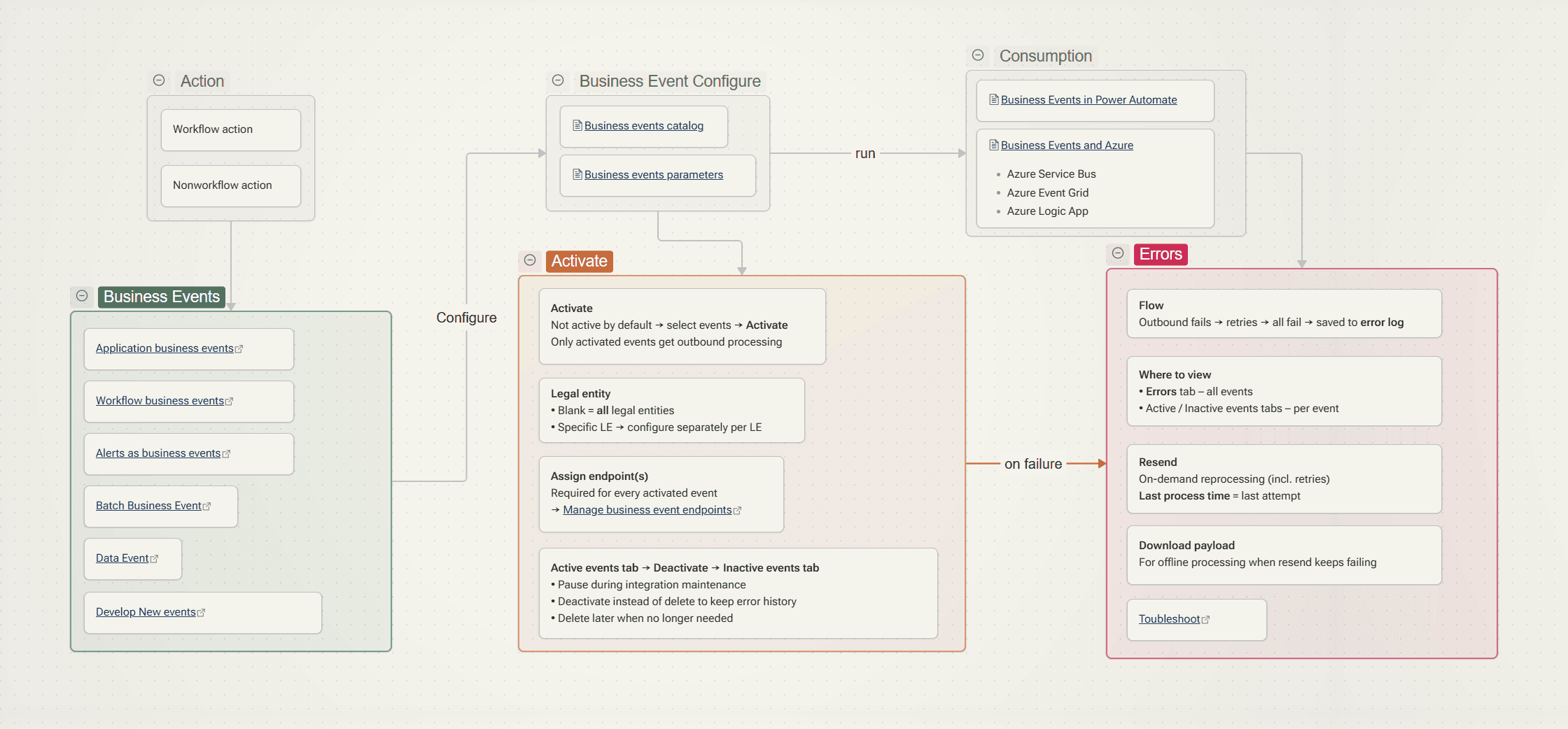
This is an overview of business events in Finance & Operations (F&O). Business events notify an external system as soon as something happens in F&O, such as a purchase order being confirmed, a batch job failing or a workflow step starting. F&O publishes a JSON payload to an endpoint you own, like Azure Service Bus, Event Grid, an HTTPS webhook or Power Automate, and the receiver decides what to do with it.
This guide covers three things:
- what business events are and where they go
- how to set it up from start to finish
- how to diagnose the errors you are most likely to hit
How business events work
Event types
| Type | Raised when | Notes |
|---|---|---|
| Application business events | A business process step happens, e.g. a purchase order is received or confirmed | You can download a JSON schema from the catalog |
| Workflow business events | A workflow or workflow element starts or finishes, a work item is created, or an automated task starts | Generated for each enabled workflow (see naming below) |
| Alert business events | An alert rule fires | Turn alerts into events instead of only sending email |
| Batch business events | A batch job starts, finishes, fails or is canceled | Useful for monitoring jobs |
| Data events | A data entity, exposed as a virtual table, is created, updated or deleted | Requires Power Platform integration and has no schema download |
The batch events are Batch job started (the job is marked as running), finished, failed and canceled.
The catalog
The Business events catalog (System administration > Setup > Business events) lists every event available in the environment. It is built during database synchronization at deployment time. For each event it shows:
- a description of where it occurs in the process
- the list of data fields sent
- a Download schema action that returns the JSON schema integration developers code against
Data events are listed separately and have no schema download. You build the schema from the field list instead. The entity fields are delivered in the Target and PreImage properties of the Dataverse RemoteExecutionContext.
Endpoint types
| Endpoint | Equivalent when subscribing from Dataverse |
|---|---|
| Azure Service Bus queue | Service Bus queue |
| Azure Service Bus topic | Service Bus topic |
| Azure Event Grid | Event Grid |
| Azure Event Hubs | Event Hub |
| Azure Blob Storage | Not supported |
| HTTPS | Webhook |
| Power Automate | Asynchronous callback registration |
| Dataverse | Plug-in or SDK step registration |
You can’t create Power Automate or Dataverse endpoints manually. They appear on the Endpoints tab automatically when a flow subscribes to an event, or when a plug-in or SDK step is registered on the event in Dataverse.
How to set up business events
1. Grant security
Once role-based security for business events is fully enabled, users without an admin role see only the events their roles are assigned to. They may see none at all.
| Requirement | Privilege / duty |
|---|---|
| View the catalog | BusinessEventsCatalogView |
| Activate events | BusinessEventsCatalogMaintain |
| Create and manage endpoints | Business events security privilege / duty |
| Subscribe from external apps (Power Automate) | Subscribe to business events from service |
| View security setup | BusinessEventsCatalogSecuritySetupView |
| Manage security | Maintain business events catalog security |
2. Check the parameters
Go to System administration > Setup > Business events parameters.
| Parameter | Default | Meaning |
|---|---|---|
| Retry count | 3 | Number of retries after a send fails |
| Wait time between retries | 1000 ms | Interval between retries |
| Endpoints allowed per event | 10 | Maximum endpoints per event per legal entity |
| Key vault secret cache interval | 5 min | How long Key Vault secrets stay cached in memory |
| Processing threads | max 4 | With dedicated processing, the count applies to each batch AOS. With the batch job, it is the number of extra batch tasks |
| Bundle size | – | Number of events in each bundle. See the performance section |
| Send object in Event Grid data field | Off | Off sends the payload as a JSON string. On sends it as an object |
| HTTP timeout | 10 s | Timeout for the HTTPS adapter. Enter 0 to use the default |
3. Create an endpoint (Azure)
For Service Bus, Event Grid and Event Hubs, the usual setup is:
- Create the Azure resource, such as a Service Bus namespace with a queue or topic.
- Create an Azure Key Vault and store the connection string or key as a secret.
- Register a Microsoft Entra ID application, create a client secret, and give the app access to the Key Vault secrets.
- In the catalog, go to Endpoints > New and enter:
- the endpoint type
- the queue, topic or hub name (or the Event Grid topic endpoint URL)
- the application ID
- the client secret value
- the Key Vault DNS name
- the secret name
Microsoft’s tutorials walk through each type: Service Bus, Service Bus queue, Event Grid and Event Hubs.
Plan for secret expiry from the start. Azure app secrets last at most two years, and F&O can’t update the app ID or secret on an existing endpoint. Rotating the secret means creating a new endpoint and pointing your events at it before the old secret expires.
4. Activate the event
- In the Business event catalog, select the events and choose Activate. Events aren’t active by default, and only active events are processed.
- Choose the legal entity. Leave it blank for all legal entities, or pick one and repeat the setup for each legal entity you need.
- Assign one or more endpoints.
Events are sent asynchronously by a batch process after the transaction commits. If an endpoint can’t be reached, F&O retries according to Retry count and Wait time between retries. If every retry fails, the event appears on the Errors tab, where you can Resend it or Download payload to process it another way.
To pause an event, for example during maintenance on the receiving side, deactivate it rather than deleting it. Deactivated events move to the Inactive tab and keep their error history.
5. Consume from Power Automate
- Business events use the Finance & Operations connector’s business event trigger. Choose the environment, category and event. The subscription creates the endpoint and activation in F&O for you.
- Data events use the Dataverse connector.
- Common pattern: download the schema from the catalog, paste it into a Parse JSON action, then use the parsed fields in later actions.
Common issues and fixes
Catalog and activation
| Symptom | Cause / fix |
|---|---|
| A new custom event or a newly configured workflow element doesn’t appear in the catalog | The catalog is only rebuilt during a full database sync. Run Manage > Rebuild business events catalog. |
| F&O events don’t appear on the Catalog Assignment tab of the virtual entity solution in the Power Platform maker portal | They should sync automatically. If they don’t, run Rebuild business events catalog to force a sync. |
| The Errors tab shows "Unable to load one or more of the requested types…" | Rebuild the catalog. |
| "0 is an invalid bundle size", events never trigger, flows never trigger, or "reached the limit of zero configured endpoints" | Business event parameters weren’t set correctly after an update. In non-production, set Retry count = 3, Endpoints allowed per event = 10 and Wait time = 1000. Then restart the batch service and run IISReset. |
| Alert business events don’t trigger | This can be caused by the alert’s email sending. Turn off Send email on the alert and test again. |
| Endpoints are missing after a database refresh or move | This is expected. Database movement removes business event and data event endpoints. Recreate the endpoints in the target environment. |