Skip to content

blog.dyn365.wiki

Tips | Resources | Features | Troubleshoot

  • Blog
  • Library
    • Learning
    • New Release
  • Tools
    • D365 Workflow Reader

System

Sync Active Users into a Teams with Power Automate
2026-07-30 by [email protected]
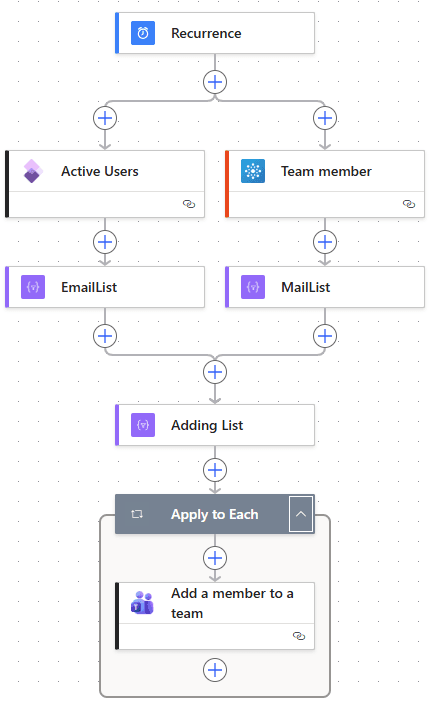
Active Users into MS team

A step-by-step Power Automate flow that periodically compares active D365 Finance & Operations users against Microsoft Teams membership and adds the missing ones. The build order of the actions is what makes it work.

Categories How-To Tags PowerApps, PowerAutomate, System, Teams Leave a comment
  • Business Process (10)
  • How-To (20)
  • Modules (3)
  • Troubleshooting (5)
  • RSS Feed
  • YouTube
  • LinkedIn

AccountsPayable (7) AccountsReceivable (9) AI (6) Bank (6) Batch (3) Budget (2) BusinessDocument (5) CoA (3) CustomerInvoice (6) Deployment (3) Development (4) DimensionFramework (3) DMF (2) ElectronicReporting (4) ExcelAddIn (3) Expense (1) FeatureManagement (9) FixedAsset (4) GeneralLedger (11) Implementation (5) Inventory (4) InventoryTransaction (3) LCS (4) License (1) Obsidian (1) Odata (1) Organization (2) Payment (7) Performance (3) PostingProfile (3) PowerApps (3) PowerAutomate (2) PPAC (2) ProcessAutomation (5) PurchaseOrder (2) Reconciliation (2) Sales (2) Security (2) Settlement (3) Tax (2) Tax1099 (2) Teams (1) Vendor (2) VendorInvoice (5) workflow (2)

© 2025 blog.dyn365.wiki · This site uses Google AdSense and cookies. See our Privacy Policy for details.

© 2026 blog.dyn365.wiki • Built with GeneratePress